

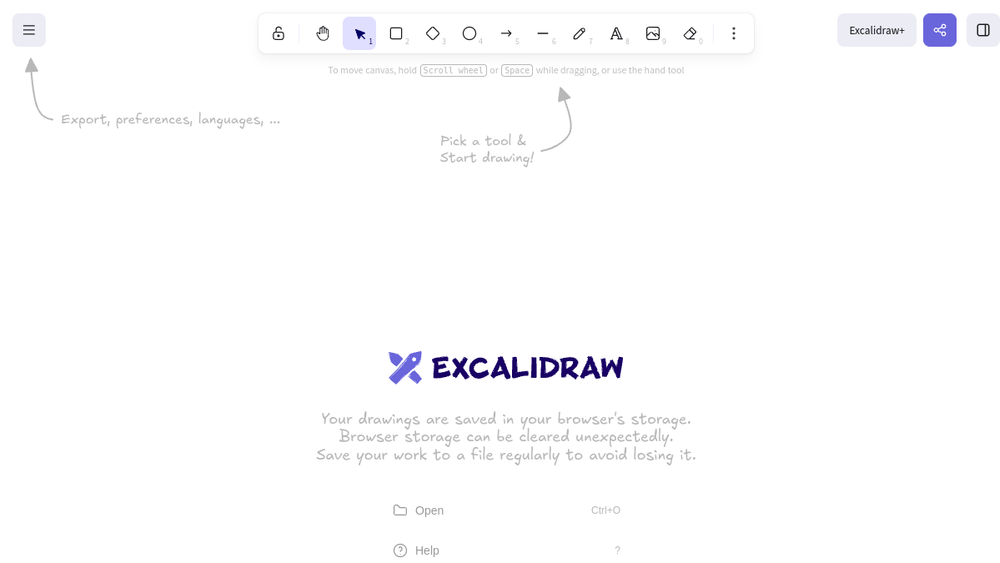
Overview
Excalidraw is a virtual collaborative whiteboard tool that lets you easily sketch diagrams that have a hand-drawn feel to them. It is designed to facilitate quick, visual communication among teams, making it simple to brainstorm, plan, and share ideas in a digital space. The tool emphasizes simplicity and ease of use, allowing users to create diagrams without the complexity of traditional design software.
Excalidraw fits into the broader category of design and collaboration tools, serving as a lightweight alternative to more feature-rich whiteboarding platforms. It is particularly useful for remote teams, educators, and anyone who needs to convey concepts visually without investing time in learning a steep curve. The hand-drawn aesthetic adds a personal touch that can make diagrams feel more approachable and less formal.
Best for
- Remote teams needing a quick, collaborative whiteboard for brainstorming and planning sessions.
- Educators and students who want to create visual explanations or study aids with a hand-drawn feel.
- Product managers and developers sketching out user flows, architecture diagrams, or wireframes.
- Designers looking for a simple tool to iterate on ideas before moving to more advanced design software.
- Anyone who needs to communicate visually in real-time with others, without the overhead of complex project management features.
Key capabilities
- Real-time collaboration: Multiple users can work on the same canvas simultaneously, seeing each other's changes as they happen.
- Hand-drawn style: The default rendering gives shapes and text a sketch-like appearance, which can make diagrams feel more informal and creative.
- Simple drawing tools: Includes basic shapes, arrows, text, and freehand drawing, sufficient for most diagramming needs.
- Export options: Users can export their drawings as images (PNG, SVG) or copy them to the clipboard for easy sharing.
- Embeddable: Excalidraw can be embedded in other applications or websites, allowing for integration into existing workflows.
- Open source: The project is open source, which means it can be self-hosted or customized by organizations with specific needs.
Common workflows
- Brainstorming: A team opens a blank Excalidraw canvas and uses sticky notes, shapes, and freehand drawing to capture ideas during a virtual meeting.
- User flow mapping: A product manager sketches out the steps a user takes through an app, using arrows and rectangles to represent screens and decisions.
- Architecture diagramming: A developer creates a high-level system architecture diagram, showing components and their interactions with simple shapes and connectors.
- Educational illustration: A teacher prepares a visual explanation of a concept, such as a flowchart or a diagram of a process, and exports it as an image for a presentation.
- Design iteration: A designer quickly sketches multiple layout options for a webpage, sharing the canvas with a colleague for immediate feedback.
What to evaluate
- Asset formats: Consider whether the export options (PNG, SVG) meet your needs for sharing or further editing in other tools.
- Prototyping depth: Excalidraw is not a full prototyping tool; evaluate if its limited interactivity is sufficient for your design validation needs.
- Collaboration features: While real-time collaboration is available, assess whether features like presence indicators, comments, or version history are adequate for your team's workflow.
- Handoff: If you need to pass designs to developers, consider how well the exported assets integrate with your development pipeline.
- Brand-system workflows: For teams with strict brand guidelines, evaluate whether the hand-drawn style and limited styling options align with your visual identity.
Getting started
- Visit the official Excalidraw website at https://excalidraw.com.
- Click on the canvas area to start drawing; use the toolbar on the left to select shapes, text, or freehand tools.
- To collaborate, share the URL of your canvas with others; they can join and edit in real time.
Why ToolSift lists it
Excalidraw is listed under the Design category and tagged with Design Tools, Whiteboarding, and Collaboration because it serves as a versatile tool for visual communication and teamwork. The official URL was verified as https://excalidraw.com, and the description aligns with the product's stated purpose. For more information, visit Excalidraw.

