Overview
Workato is a cloud-based integration platform as a service (iPaaS) that enables organizations to connect their applications, data, and business processes. It provides a unified environment for building automations and orchestrating workflows across a wide range of software tools. The platform is designed to support both technical and non-technical users, offering a visual interface for creating integrations without extensive coding.
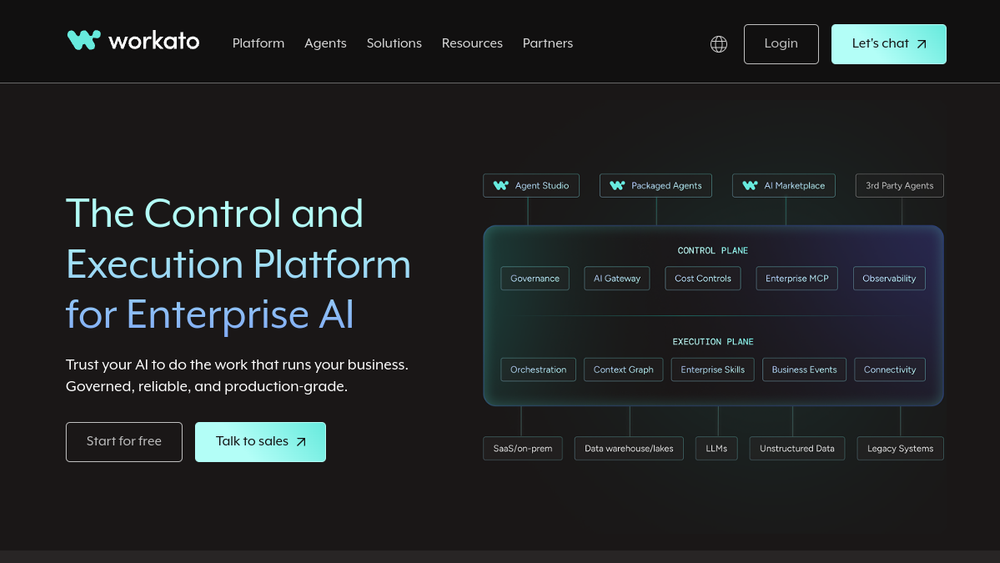
Workato positions itself as a control and execution platform for enterprise AI, emphasizing governance and reliability. It allows businesses to automate complex processes, manage data flows, and deploy AI agents in a controlled manner. With a large library of pre-built connectors, Workato aims to simplify the integration landscape for enterprises.
Best for
- IT and integration teams looking to centralize and manage enterprise-wide automation.
- Business operations teams seeking to automate workflows without heavy coding.
- Organizations adopting AI that need to govern and integrate AI agents into existing processes.
- Enterprises with complex integration needs across many SaaS applications.
- Teams requiring robust monitoring and error handling for critical workflows.
Key capabilities
- Visual workflow builder: Create automations using a drag-and-drop interface, reducing the need for custom code.
- Extensive connector library: Access to over 14,000 pre-built connectors for popular apps and services.
- AI agent governance: Manage and control AI agents within workflows, ensuring compliance and reliability.
- Real-time and batch processing: Support for event-driven triggers and scheduled jobs.
- Error handling and monitoring: Built-in tools for tracking workflow performance and troubleshooting failures.
- Role-based access control: Manage user permissions to ensure secure and appropriate access to automation resources.
Common workflows
- Automated lead routing: When a new lead is captured in a CRM, Workato can automatically assign it to the appropriate sales representative based on predefined rules, and notify the team via Slack.
- Invoice processing: Extract data from incoming invoices (e.g., via email or PDF), validate it, and sync it to an accounting system, triggering approval workflows.
- Employee onboarding: When a new hire is added to HR software, Workato can create accounts in IT systems, provision access, and send welcome emails.
- Customer support ticketing: Integrate a support platform with a knowledge base to automatically suggest solutions or escalate issues based on sentiment analysis.
- Data synchronization: Keep customer data consistent across multiple systems (e.g., CRM, marketing automation, and billing) by syncing updates in real time.
What to evaluate
- Connector coverage: Assess whether the specific applications your organization uses are supported and whether custom connectors are feasible.
- Pricing model: Understand how pricing scales with usage, number of tasks, or number of users, and whether it fits your budget.
- Ease of use: Consider the learning curve for your team, especially for non-technical users.
- Governance and security: Evaluate features for access control, audit logs, and compliance with your organization's security policies.
- Support and community: Look into available support options, documentation, and community resources for troubleshooting and best practices.
Getting started
- Sign up for a trial: Visit the Workato website and create an account to explore the platform.
- Explore templates: Browse the library of pre-built recipes and templates to understand common use cases.
- Build a simple integration: Start with a basic workflow connecting two apps to familiarize yourself with the interface and capabilities.
Why ToolSift lists it
Workato is listed under Automation and Business categories, with tags including Workflow Automation, Integrations, No-Code, and Business Tools. These classifications reflect its core function as an integration and automation platform for enterprise use. The official URL (https://www.workato.com) was verified, and the page title and meta description align with the product's positioning as a control and execution platform for enterprise AI. For more information, visit Workato's official website.