Overview
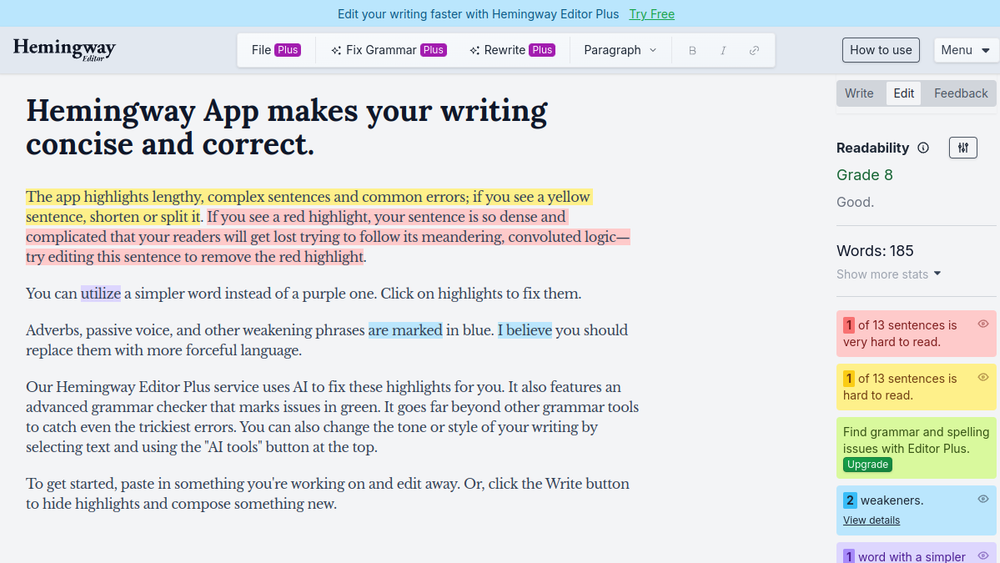
Hemingway Editor is a web-based writing tool designed to help writers improve the clarity and readability of their prose. It analyzes text and highlights common issues such as overly complex sentences, passive voice, adverbs, and phrases that can be simplified. The tool provides a visual color-coded interface, making it easy to identify areas for improvement at a glance.
Hemingway Editor fits into the writing workflow as a self-editing aid. It is not a grammar checker in the traditional sense; instead, it focuses on style and readability. Writers can paste their text into the editor, review the suggestions, and make revisions directly in the tool. The current version, Hemingway Editor Plus, also includes grammar checking and tone adjustment features, expanding its utility beyond style suggestions.
Best for
- Writers who want to simplify complex sentences and improve readability.
- Bloggers and content creators aiming for a clear, concise writing style.
- Students and academics who need to make their papers more accessible.
- Editors and proofreaders looking for a quick style review tool.
- Non-native English speakers who want to identify awkward phrasing.
Key capabilities
- Highlights long, complex sentences in yellow and red for easy identification.
- Flags passive voice constructions in green.
- Detects adverbs and suggests stronger verb choices.
- Provides a readability score (grade level) for the text.
- Offers grammar checking and tone adjustment in the Plus version.
- Allows direct editing within the tool, with a side-by-side view of suggestions.
Common workflows
-
Drafting and self-editing: Write a draft in your preferred word processor, then paste it into Hemingway Editor to identify areas for improvement. Revise directly in the tool, then copy the cleaned text back to your document.
-
Blog post optimization: Before publishing a blog post, run it through Hemingway Editor to ensure the content is clear and engaging. Use the readability score to target a specific grade level for your audience.
-
Academic paper revision: Use Hemingway Editor to check for overly complex sentences and passive voice in academic writing. Simplify sentences to improve clarity without losing academic rigor.
-
Email and professional communication: Paste important emails or reports into Hemingway Editor to ensure they are concise and direct, reducing the risk of misinterpretation.
-
Collaborative editing: Share your screen with a colleague or editor while using Hemingway Editor to discuss and apply changes in real time.
What to evaluate
- Writing stage: Consider whether you need a tool for drafting, editing, or final proofreading. Hemingway Editor is best suited for the editing stage, not for generating content.
- Tone control: The Plus version offers tone adjustment, but the free version focuses solely on style. Evaluate if tone features are essential for your work.
- Language support: Hemingway Editor primarily supports English. If you write in other languages, check if the tool meets your needs.
- Editing transparency: The tool provides clear, color-coded suggestions, but it does not explain why a change is suggested. Consider if you need detailed explanations.
- Privacy: Since you paste text into the web-based tool, consider the sensitivity of your content and the privacy policies of the service.
- Export workflow: Hemingway Editor does not integrate directly with word processors; you must copy and paste text in and out. Evaluate if this fits your workflow.
Getting started
- Visit the official website at https://hemingwayapp.com.
- Paste your text into the editor or start typing directly.
- Review the highlighted suggestions and make revisions as needed. Use the readability score to gauge progress.
Why ToolSift lists it
Hemingway Editor is listed under the Text category with tags Writing Tools, Grammar Checker, and Content Writing. It is a practical tool for writers seeking to improve clarity and style. The official URL was verified as https://hemingwayapp.com, and the tool's current description accurately reflects its purpose: making writing bold and clear. ToolSift includes it to help users discover a reliable, focused solution for text refinement.